How I have my VBar Control configured
Stick Setup
I use a hybrid grip, with thumbs on top and index fingers resting on the front of the sticks. This allows a pinch style grip during slower stick movements, but also allows fast movement by lifting the index fingers away to be thumbs only. Your setup will still be generally more sensitive around centre than a thumber, so as always it’s a case of trying to figure out what works for you.
I also use a centre-sprung throttle. I chose to do that for some benefits that you can get during set manoeuvres for F3N, but it takes a while to get used to, and will have some negative side-effects. After having a few people try it by converting their transmitters over, and then converting them back when they didn’t like it, I now don’t suggest anyone uses centre-sprung, unless you have a really good use-case.
One interesting thing it allows you to do, is zero degree autorotations.
Autorotations, with NO pitch!! Can it be done?
Switch Configuration
I appear to have fat fingers, so when I switched over to VControl, I found my fingers didn’t fit nicely between the top switches like they did on the DX8. I had to have them apart, which made them unusable during normal flight, so my 2 primary switches are on the front. Bank switch on the left and Run switch on the right.
I have 2 top switches setup for secondary functions, but they don’t get in the way, as I only use them for screenshots and telemetry readouts.
Telemetry readout is set to RPM, Current and Throttle Output. This gives me a general idea of how the heli is flying with headspeed, amp draw and how much throttle headroom is available.
General Settings
The only items I change in the settings are cloud services and auto-off.
I use cloud services with VBar Utilities to do my flight stats, so I turn cloud services on and leave Wi-Fi on. I tried turning W-Fi off to save power, but Mikado says it draws very little, and that the screen consumes the most by far.
Auto-off is set to 30 seconds. If I’m flying back to back, it doesn’t have time to turn off. And if I’m have a slow day, it still turns off pretty quickly and saves power.
The auto-on keeps working, so I don’t have to press any buttons. It comes on automatically when I power the model up.
Installed Apps
Here is a list of all the Apps I have installed on my VControl at the moment.
Screen Layout
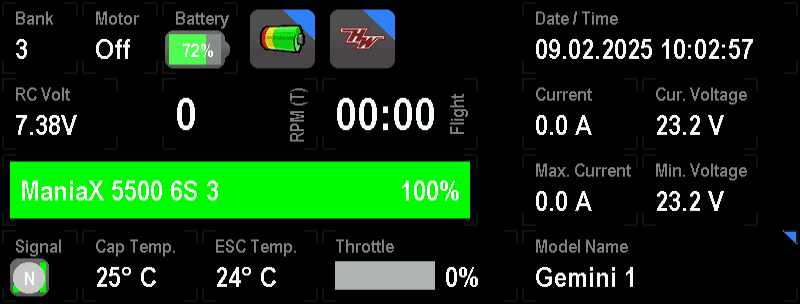
I’ve configured my screen to give as much information as possible, as well as quick access to battery and ESC configuration.
I check Current Voltage at the end of most flights to make sure the battery is configured to land at the right time, and the rest are just useful.
One thing I do is have multiple screens set up that all look like this, but are for HobbyWing, YGE, Scorpion, etc. That way when flying someone else’s model I can quickly select a screen instead of having it miss most of the data.
Extra battery and fast charger
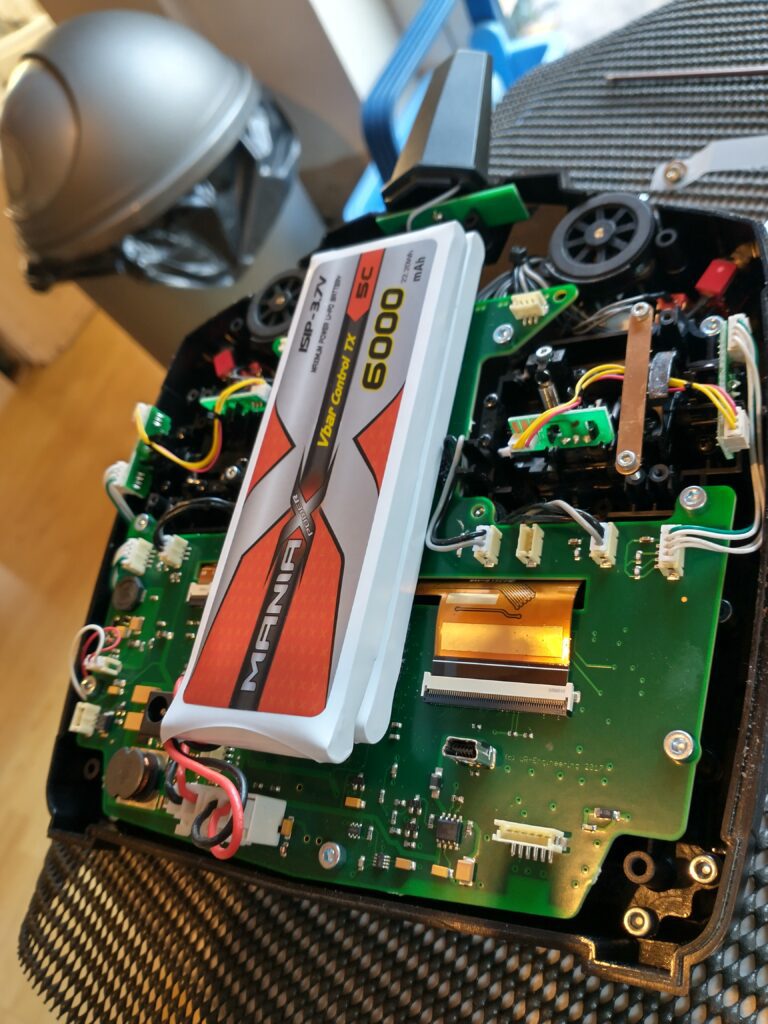
I have a 2nd battery installed to give longer between charging. It will do a day on one battery, but there are times where you haven’t charged, which means it won’t last.
I also have a 12v charge lead in the car from the cigarette lighter. This does a fast charge while I’m driving to the field, which is very useful. I very rarely charge via the wall socket these days.